好用的哈萨克文键盘
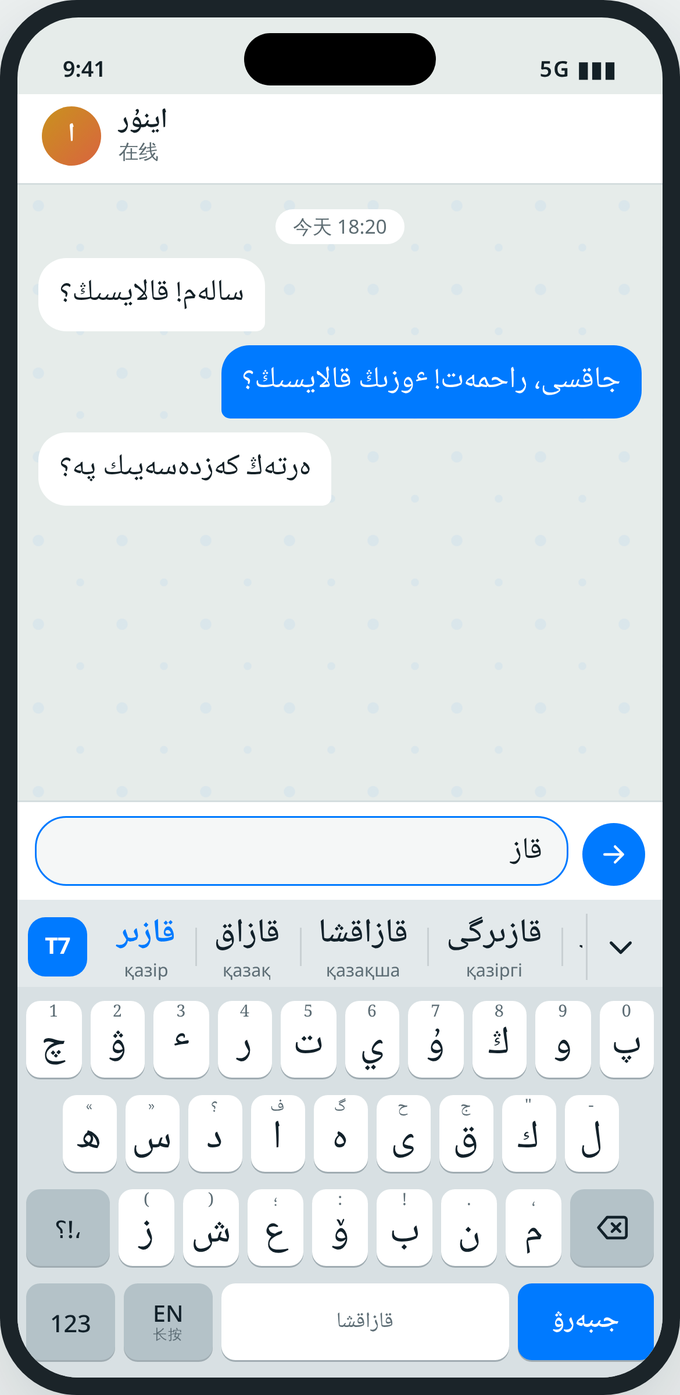
阿拉伯字母(托特文)为主,同时支持西里尔字母和英文。候选词、下一个词联想、一键互转,打字更快更准。
功能
候选词和联想
词库约 6 万词。每个候选下面显示另一种文字的写法,打完一个词还会提示下一个词。
自动处理 ٴ
按空格时自动加上或去掉 ٴ,不用自己记规则;按删除键可以马上恢复原样。
一键互转
阿拉伯字母和西里尔字母一键互转。选中一段文字,就只转选中的部分。
拼错也能找到
打错、漏打一个字母,候选里也会给出正确的词。
记住你的新词
人名、地名等新词打过两次就会出现在候选里,只存在你的手机上。
表情和常用语
哈萨克风表情,100 句常用语(阿拉伯字母、西里尔字母、中文对照),三套皮肤。
怎样开始使用(iPhone)
安装
在 App Store 下载 Til7 输入法,打开一次。
添加键盘
设置 → 通用 → 键盘 → 键盘 → 添加新键盘 → 选 Til7。
切换
在微信等任意 App 里打字时,长按 🌐 选 Til7。
完全访问(可选)
不打开也能正常打字。打开后,App 里的设置会同步到键盘,并有按键音。
不联网,打的字只留在你的手机上
没有广告,没有统计,没有第三方 SDK。我们不收集任何个人信息。
常见问题和联系我们
为什么 iOS 提示“完全访问可能传输你键入的内容”?
这是苹果对所有第三方键盘的统一提示。Til7 输入法不联网,不会传输你打的字。不打开完全访问也能正常使用。
怎么打中文?
长按右下角的文字键选“中文”,会切换到手机自带的中文键盘。
密码框里为什么变成了系统键盘?
这是 iOS 的安全规定:密码输入框只能用系统键盘。
怎样清除键盘记住的词?
安卓:Til7 App → 关于 → 清除键盘记住的词。iOS:删除 App 后会全部清除。
其他问题、建议或者想要的新词,请发邮件到 support@til7.com,我们会在 15 个工作日内回复。
A better Kazakh keyboard
Arabic‑script Kazakh (Töte) first, plus Cyrillic and English. Word suggestions, next‑word prediction and one‑tap script conversion.
Features
Suggestions and predictions
About 60,000 words. Each suggestion shows its spelling in the other script, and the next word is suggested as you go.
Automatic ٴ
The hamza is added or removed when you press space. Press delete right after to undo.
One‑tap conversion
Convert between Arabic and Cyrillic script. Select text to convert only that part.
Typo correction
One wrong, missing or extra letter? The right word still shows up.
Learns your words
Names and new words you type twice appear in suggestions, stored only on your phone.
Emoji and phrases
Kazakh‑themed emoji, 100 common phrases in Arabic script, Cyrillic and Chinese, and three themes.
Getting started (iPhone)
Install
Download Til7 Keyboard from the App Store and open it once.
Add the keyboard
Settings → General → Keyboard → Keyboards → Add New Keyboard → Til7.
Switch
In any app, press and hold 🌐 and choose Til7.
Full Access (optional)
Not needed for typing. Turn it on to sync settings from the app and to hear key sounds.
No internet. What you type stays on your phone.
No ads, no analytics, no third‑party SDKs. We collect no personal information.
FAQ and support
Why does iOS warn that Full Access can transmit what I type?
Apple shows this warning for every third‑party keyboard. Til7 Keyboard has no internet access and transmits nothing. It works without Full Access.
How do I type Chinese?
Press and hold the script key at the bottom right and choose 中文 to switch to your phone's Chinese keyboard.
Why does the system keyboard appear in password fields?
iOS only allows the system keyboard in password fields, for your security.
How do I clear learned words?
Android: Til7 app → About → Clear learned words. iOS: deleting the app removes them.
For other questions, suggestions or missing words, email support@til7.com. We reply within 15 working days.